

My Financial Health Suite is a wonderful tool available within OVB Online that offers the services to help you monitor the security of your bank accounts at no cost to you.
You also have the option to upgrade to an enhanced version (Premium Subscription) of these services for a fee.
If you would like to cancel your Premium Subscription, follow the steps below.
- Login to OVB and locate My Financial Health Suite on the Dashboard, then click See more.
- Once you have clicked see more to enter into My Financial Health Suite, in the menu, Select Manage Account at the bottom of the list.
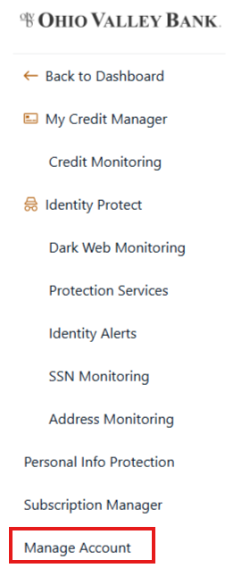
- Click Edit/Cancel Plan.
- Select Cancel Premium.
- The system will then list a summary of the benefits the premium version provides. Click Cancel Premium to continue.
- A message will appear with a short survey asking the reason why the service was canceled.
- The system will then direct you back to Manage Account. Your cancellation will be complete and you will not be charged again, but you will still have access to Premium services for the remainder of the billing cycle. On the screen, under Account Status, you will see the date when your access to Premium features expires. After that date, you will still be able to use the Free Basic version of My Financial Health Suite.
- You may also receive a cancellation confirmation in your Messages area within OVB Online.
If you need further assistance, please reach out to any OVB office, email our Customer Support experts, or click on Support inside OVB Online digital banking to live chat with us.